Pumpkin
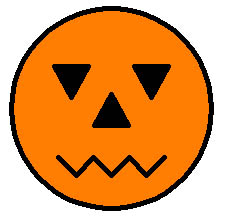
Click Run to draw a pumpkin, or change the command to pumpkins for a
ring of seven.
; Fillpoly
;
; Draws a polygon filled in with a color. The :size is the approximate
; diameter. The polygon is centered on the turtle.
to fillpoly :sides :size :color
local "step
make "step 3.14*:size/:sides
pu bk :size/2 lt 90 bk :step/2 pd
filled :color [repeat :sides [fd :step rt 360/:sides]]
pu fd :step/2 rt 90 fd :size/2
end

; Draws the head of the Pumpkin (i.e., the orange circle)
to head :size
fillpoly 50 :size "orange
end

; Draws the mouth of the pumpkin - turtle starts in the middle
to mouth :size
local "dzMouth
local "ptSave
make "dzMouth :size/8
make "ptSave pos

pd
lt 45 fd :dzMouth
lt 90 fd :dzMouth
rt 90 fd :dzMouth
rt 45
pu setpos :ptSave pd
rt 45 fd :dzMouth
rt 90 fd :dzMouth
lt 90 fd :dzMouth
lt 45
pu setpos :ptSave
end

; A generic move function - always picks up the pen.
; x and y are relative to the current heading of the turtle.
to move :dx :dy
pu fd :dy rt 90 fd :dx lt 90
end

; Draws a pumpkin of a given diameter.
to pumpkin :size
local "dxEye
local "dyEye
local "dyMouth
local "ptCenter
make "dxEye :size/5
make "dyEye :size/8
make "dyMouth :size/3
make "ptCenter pos

setpensize 5

head :size
tri :size

move -:dxEye :dyEye rt 180
tri :size
move -2*:dxEye 0
tri :size

pu setpos :ptCenter
fd :dyMouth rt 180
mouth :size

pu setpos :ptCenter
end

; A cool array of 7 pumpkins.
to pumpkins
pumpkin 200
repeat 6 [fd 210 pumpkin 200 bk 210 rt 60]
ht
end

; Draws triangular eyes and nose dimensioned for the :size'd pumpkin head.
to tri :size
fillpoly 3 :size/6 "black
end
Recursive Trees

You can make some nifty pictures of trees by using recursion.
to tree :size
  if :size < 5 [stop]
  fd :size
  lt 30 tree :size*.7
  rt 60 tree :size*.7
  lt 30 bk :size
end
Adding a little randomness makes the trees look more natural:
to rtree :size
  if :size < 5 [stop]
  fd :size
  lt 30 rtree :size*(((random 5)+5)/10)
  rt 60 rtree :size*(((random 5)+5)/10)
  lt 30 bk :size
end
Towers of Hanoi
The Towers of Hanoi puzzle may be familiar to you. It is a game of 3 pegs and a number of disks. Each disk has a different size. The puzzle starts with all the disks on one peg, with the largest disks on the bottom. The problem is to move the disks from the first peg to the last peg without ever placing a larger disk on top of a smaller one.
A simple program to solve this problem is this one. It merely prints the “moves” to be made.
to move :from :to
(print "Move "disk "on "peg :from "to "peg :to ".)
end

to tower :disks :from :to :using
if :disks = 1 [move :from :to stop]
tower :disks-1 :from :using :to
move :from :to
tower :disks-1 :using :to :from
end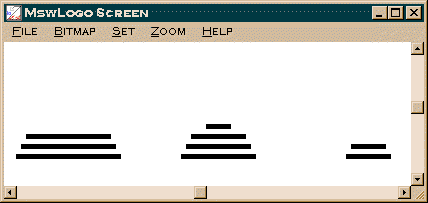
A more complex version animates all the moves. Click Run for six disks,
then try towers 10 with the speed set to Instant. Set the speed to Slow or
Crawl to watch the individual moves.
to drawdisk :disk :peg :height :fDraw
pu
setxy :peg*150-300 :height*10
ifelse :fDraw [penpaint setpensize 5] [penerase setpensize 7]
pd
bk :disk*5
fd :disk*10
end

to move :from :to
make "moves :moves + 1
; (print :moves ". "Move "disk "on "peg :from "to "peg :to ".)
make "height (item :from :stacks)
make "disk (item :height (item :from :pegs))
setitem :height (item :from :pegs) ".
setitem :from :stacks (item :from :stacks)-1
drawdisk :disk :from :height "false
make "height (item :to :stacks)+1
setitem :to :stacks :height
setitem :height (item :to :pegs) :disk
drawdisk :disk :to :height "true
; show :stacks
; show :pegs
end

to start :disks
cs
ht
make "moves 0
rt 90
setpensize [5 5]
make "stacks (array 3)
setitem 1 :stacks :disks
setitem 2 :stacks 0
setitem 3 :stacks 0
make "pegs (array 3)
repeat 3 [setitem repcount :pegs (array :disks)]
make "firstPeg (item 1 :pegs)
repeat :disks [setitem repcount :firstPeg :disks-repcount+1]
repeat :disks [drawdisk :disks-repcount+1 1 repcount "true]
end

to tower :disks :from :to :using
if :disks = 1 [move :from :to stop]
tower :disks-1 :from :using :to
move :from :to
tower :disks-1 :using :to :from
end

to towers :disks
start :disks
tower :disks 1 3 2
end